Scaling infrastructure as your user base grows is less about heroics and more about removing hidden bottlenecks before they bite you in production.
The scary part is that everything can look fine until one launch, one influencer, or one enterprise customer changes the traffic shape overnight. Latency creeps up, queues back up, and a small database lock turns into a full outage. The fix is rarely a single “scale up” button. It is a set of habits: measure what matters, design for failure, and make your system boring under load.
Here, we focus on the practical decisions that keep your app fast and reliable as usage climbs. This is the same playbook we use at AppMakers USA when teams need to scale without downtime panic.
A 5-Step Scaling Plan You Can Actually Run
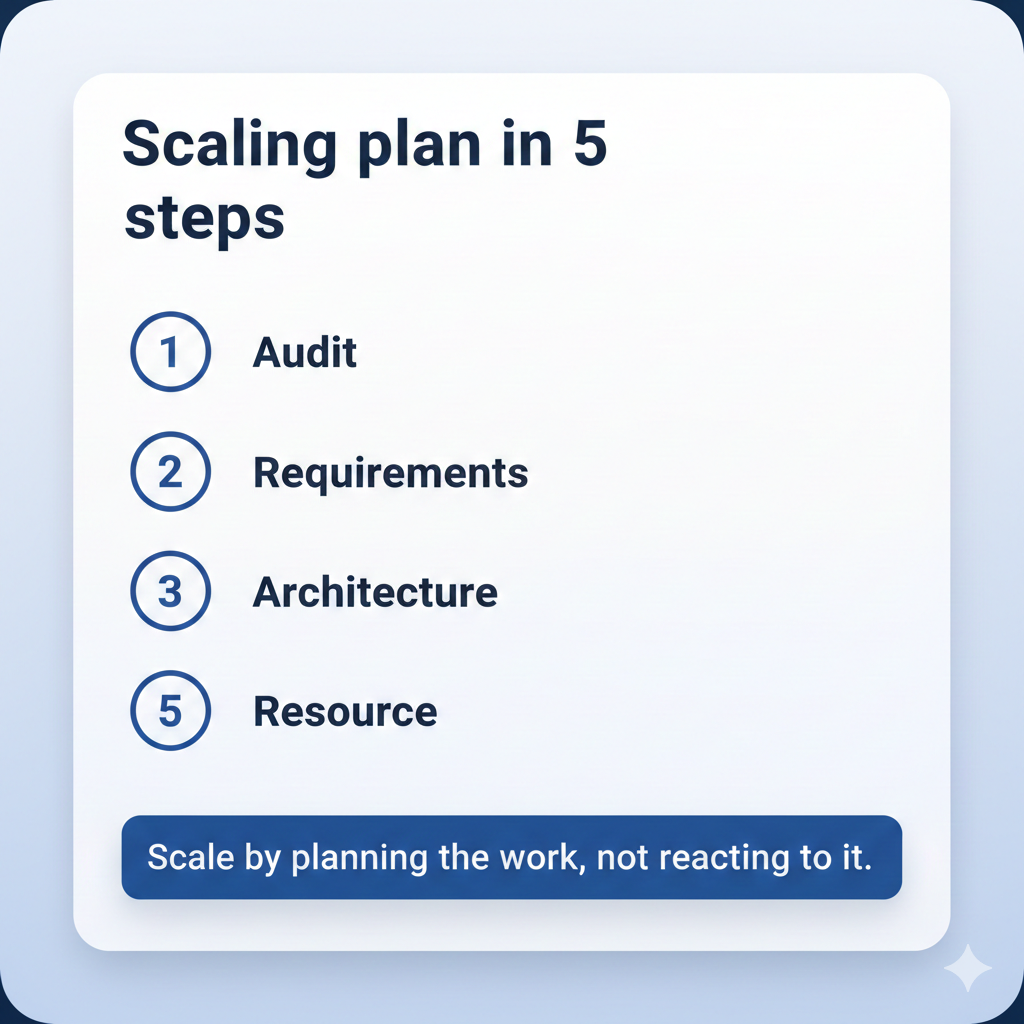
Now that the stakes are clear, turn scaling into a plan you can execute, not a reaction you survive, and if you need extra firepower, partnering with an experienced cloud app development team like AppMakers USA can keep the strategy technically sound and tied to real business goals.
Before you touch architecture or tools, you need a simple scaling plan you can execute. The five steps below walk you through what to measure, what to decide, and what to automate so growth does not turn into downtime.
- Audit your stack end to end
Start with a full request path, not just server CPU. Track p95 and p99 latency from edge to database, plus throughput, error rate, saturation, and queue depth. Baseline these KPIs by endpoint and workflow (signup, feed load, checkout, search), then set a “normal day” profile you can compare against after every release.
If you are headed toward SOC 2 or similar controls, bake in logging, access boundaries, and audit trails now so scaling work does not create security debt later.
- Define growth requirements
Write down what “growth” means in numbers like the expected MAUs, peak concurrent users, read vs write mix, and the biggest traffic events you expect (launches, promos, seasonal spikes). Convert that into targets like SLOs (uptime, latency) and capacity thresholds.
Assign owners for each domain (app tier, data tier, infra) and define decision triggers like “if p95 exceeds X for Y minutes” or “if queue wait exceeds Z” so you are not arguing during an incident.
- Choose an architecture that can stretch
Design around the parts that will heat up first.
Keep the app tier stateless so you can scale horizontally, isolate hotspots (search, feed ranking, notifications), and use caching deliberately. If you have regional users, consider edge caching and regional reads early so distance does not become your hidden bottleneck.
- Automate the boring parts
Turn your requirements into guardrails: autoscaling policies, queue-based workers, rate limits, and backpressure so spikes do not knock over your core systems. Harden CI/CD with safe deployments (feature flags, canaries, rollbacks) and add redundancy where it actually matters (databases, queues, critical services).
The goal is simple: routine growth should not require heroics, and incidents should have a predictable playbook.
- Resource it like a real program
Scaling fails when it is treated like a side quest. Budget for total cost of ownership, on-call time, monitoring, and load testing, not just compute. Train the team on runbooks and incident response, then decide what you own in-house versus what you co-manage.
Observability That Catches Issues Before Users Do
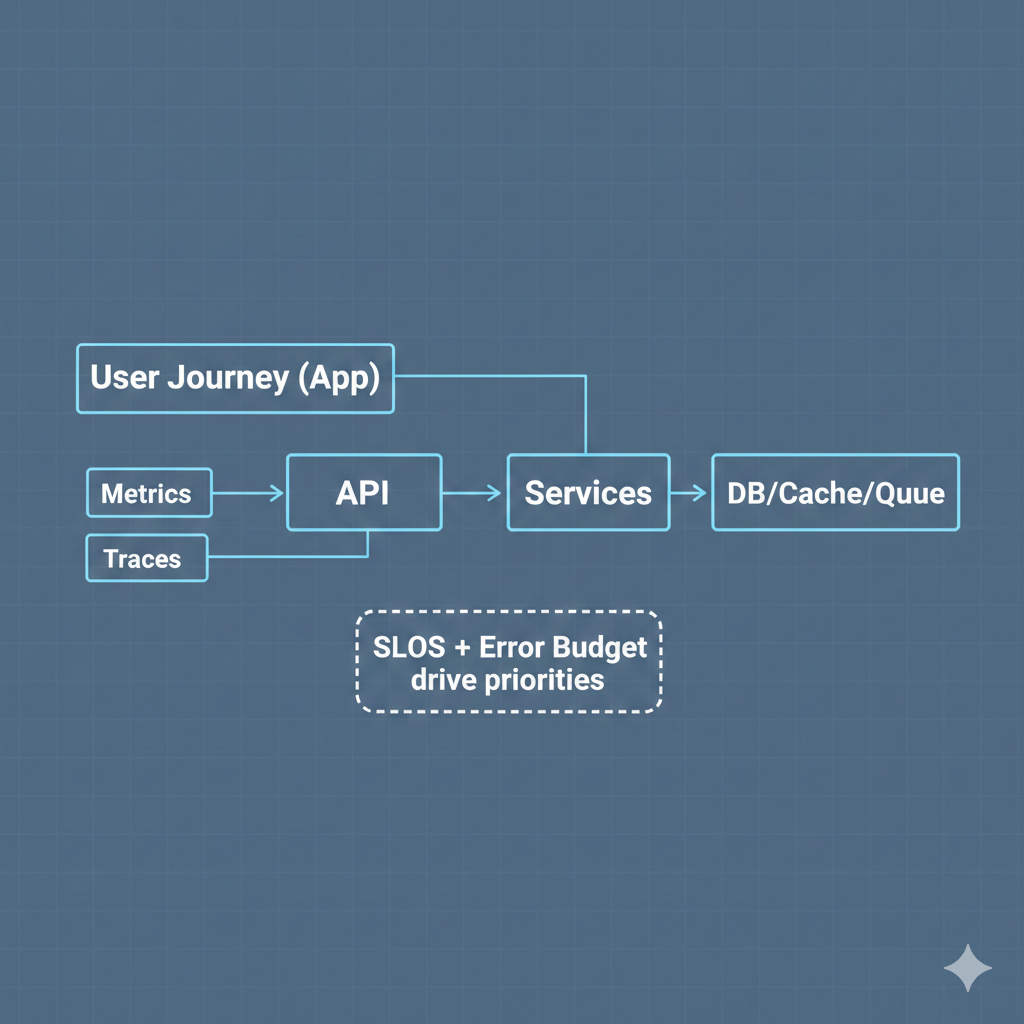
A scaling plan is useless if you cannot tell, in real time, whether the product is getting better or quietly falling apart. This is where SLOs and observability turn growth into something you can manage.
Start with SLOs that match user experience, not infrastructure trivia.
Pick 2–3 critical journeys and define targets around what users feel: signup, login, core screen load, search, checkout, message send, whatever drives your retention and revenue. Then set an error budget. When you burn it too fast, you stop shipping risky work and fix reliability first.
That is how you avoid “we are scaling” becoming “we are constantly patching.”
Next, instrument end-to-end so you can trace a problem to its real source:
- Metrics: latency (p95, p99), error rate, saturation, queue depth, database contention
- Logs: structured, searchable, tied to request IDs, with the right redactions
- Traces: full request path across services, including third-party calls
Build dashboards that answer simple questions quickly:
- What is slow right now?
- What is failing right now?
- Is it one endpoint, one region, one customer cohort, or everything?
- Did the last deploy change anything?
When integrating workflow automation or decision-making powered by AI agents, extend your observability to cover their data sources, tool calls, and failure paths so issues are caught before they impact users.
Alert on symptoms users feel, then route to the owning team with clear runbooks. Avoid alert spam. If everything pages all the time, nothing gets fixed. Finally, add synthetic checks for your most important flows so you catch failures before customers do.
Stateless App Tiers That Scale Cleanly
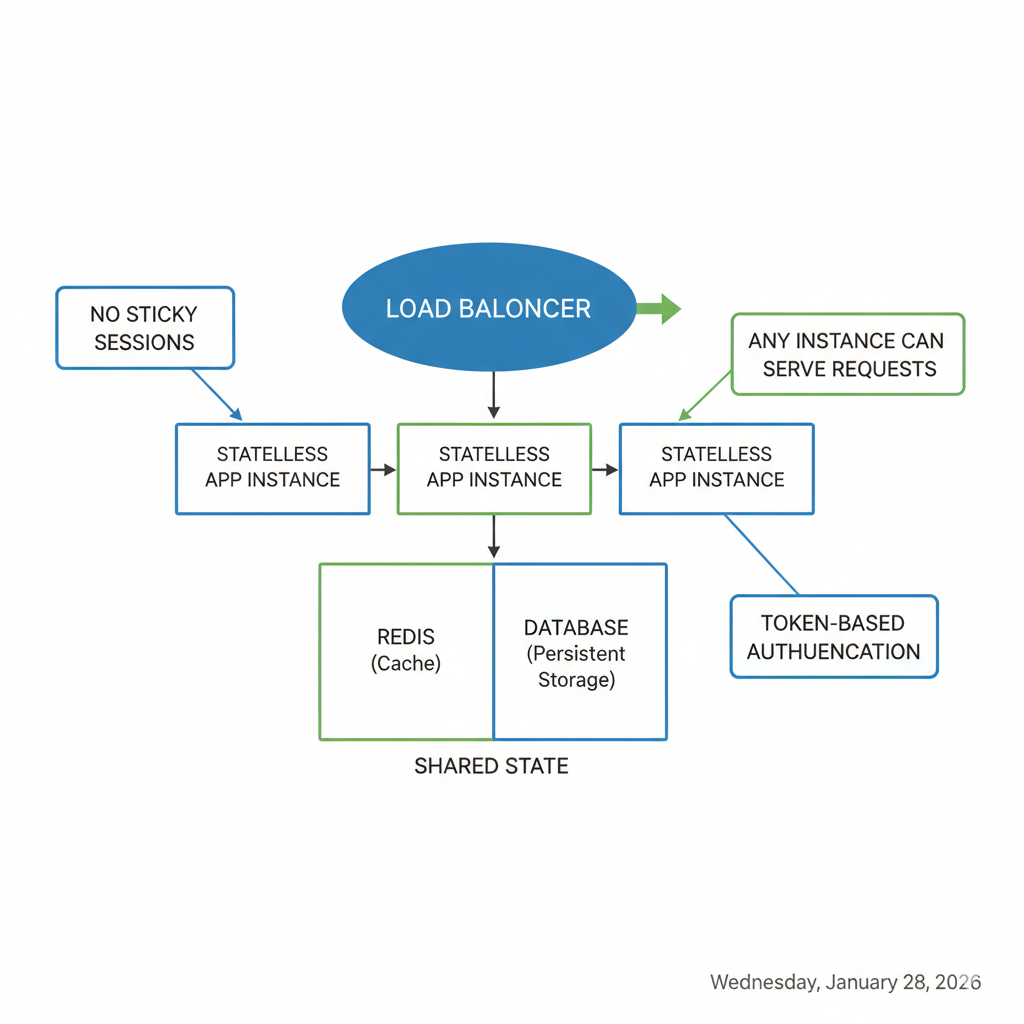
Once you can measure reliability with SLOs, the next move is making sure your app tier can scale horizontally without breaking user sessions.
Scale-out fails when the state sticks to individual instances. The fix is to make the app tier stateless and put a load balancer in front, so any healthy instance can handle any request. That gives you simpler scaling and better fault tolerance than session-bound designs.
What stateless actually means in practice
- No sticky sessions as the default. Use the load balancer to spread traffic (round robin or least connections) and fail over cleanly when a node dies.
- Every request is self-sufficient. The app reads what it needs from shared services, not local memory.
Externalize state the clean way
- Store sessions and ephemeral state in Redis (or a managed equivalent).
- Persist user state in your database, with clear ownership of what belongs there.
- Use short-lived tokens (JWTs) for auth, and keep refresh logic predictable.
This is also where AppMakers USA often helps teams tighten their backend architecture so it can support growth across regions and platforms without fragile session plumbing.
Design for retries and failure
When you scale with autoscaling and multiple instances, retries happen. Design your APIs to tolerate them:
- Make writes idempotent where possible.
- Use idempotency keys for payments, bookings, and “create” actions.
- Avoid duplicate side effects by separating “accept request” from “process job” when needed.
Operational wins you get immediately
- Deployments get easier: rolling or blue-green releases without draining sessions.
- Autoscaling becomes safer because instances can come and go without user impact.
- Outages shrink: the blast radius is mostly in-flight requests, not trapped sessions.
The tradeoff is real because cost shifts from app nodes to shared stores (Redis, DB, queues). But that is a better problem than having scaling blocked by state glued to random servers.
Scaling the Data Layer Without Breaking Production
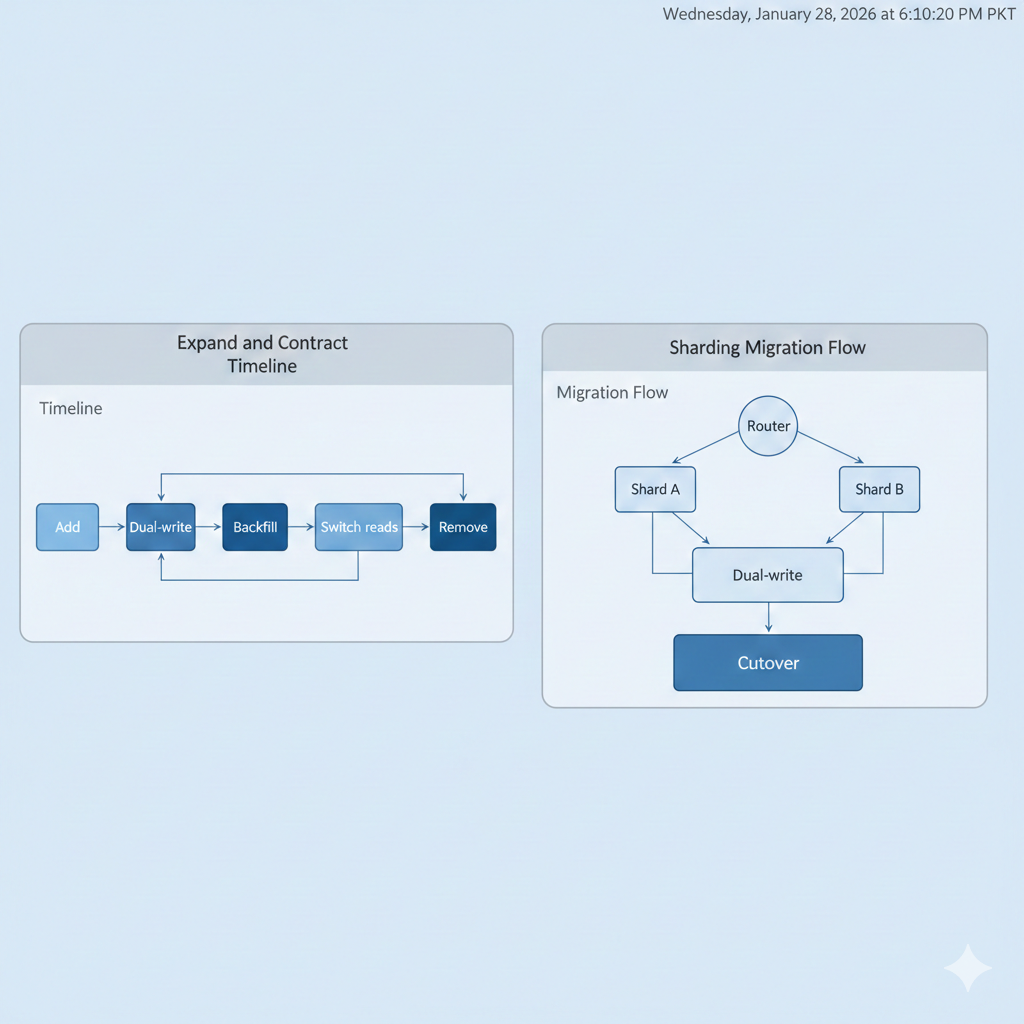
Once your app tier can scale out, the database becomes the place where “growth” turns into pain. You can add app servers in minutes. You cannot brute-force your way through a data bottleneck without breaking things.
For teams building high-traffic, cross-platform mobile apps, the best move is aligning infrastructure scaling with agile, user-centric release cycles so feature delivery and performance stay in sync.
The goal is to keep reads fast, keep writes safe, and make changes in a way you can reverse. That usually means leaning on caching where it actually helps, being disciplined about schema changes, and choosing a scaling path before you are in a fire drill.
Migrations That Don’t Take Your App Down
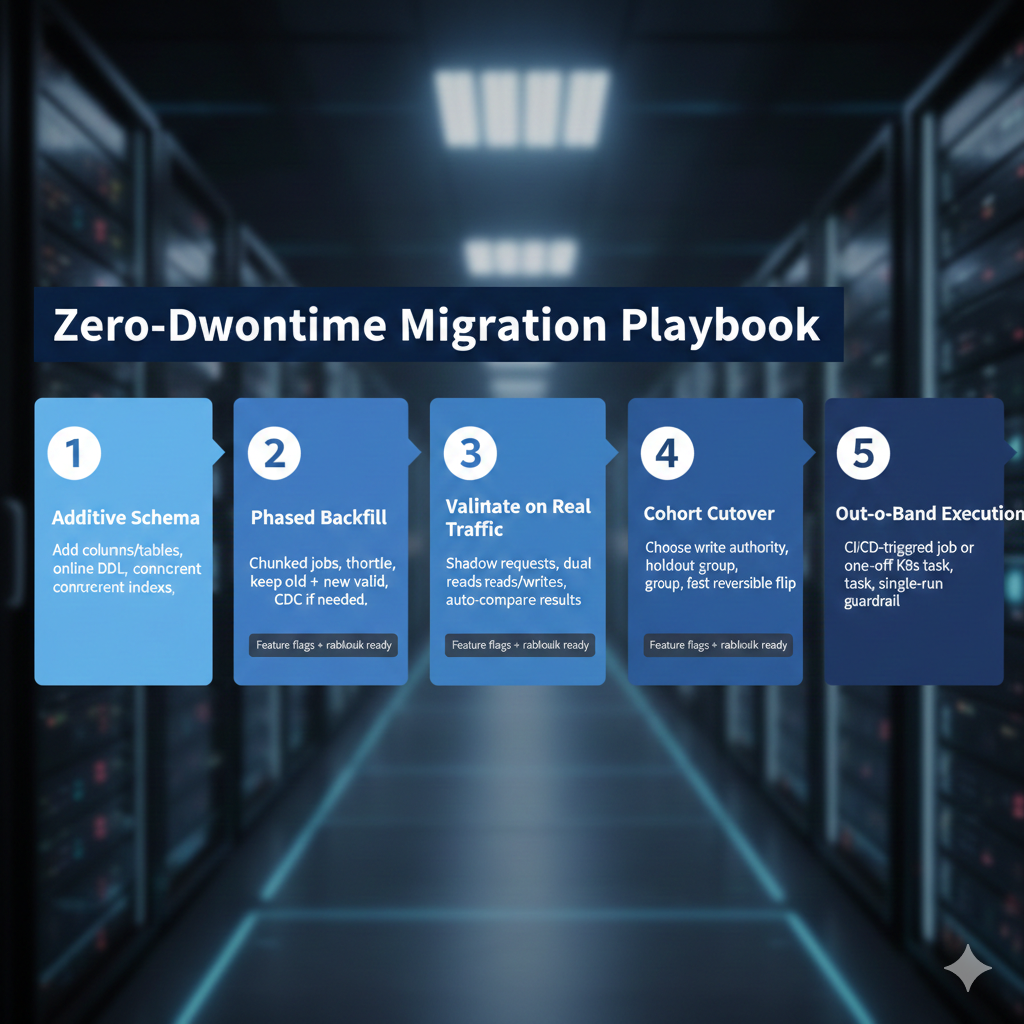
When growth starts leaning on your database, you do not “schedule a migration weekend.” You design migrations that keep the app serving traffic while you evolve the schema and move data. Ship backward-compatible changes, migrate in phases, validate against real traffic, then cut over fast with a clean rollback path.
Tools like Oracle’s Zero Downtime Migration exist for exactly this kind of phase-based, resumable cutover, but the tool is not the point. The sequencing is.
1) Start with additive changes
- Add new columns or tables first.
- Create indexes concurrently where your database supports it.
- Prefer online DDL patterns that avoid blocking reads and writes.
2) Migrate data in phases, not in one blast
- Run chunked backfills as background jobs so you can throttle.
- Keep old and new columns valid during the conversion window.
- If you need ongoing sync while traffic is live, use change data capture (CDC) to stream updates instead of re-running big batches.
3) Validate with production-like traffic
- Mirror production with shadow requests.
- Use feature flags for dual writes and, when needed, dual reads.
- Compare results automatically and alert on drift, not just failures.
4) Cut over like an orchestrated release
- Decide which path has write authority at each stage.
- Route a small cohort first, keep a holdout, then ramp.
- When you flip reads, do it quickly and keep it reversible.
5) Run migration work out-of-band
- Execute the migration as a one-off job triggered by CI/CD or a single Kubernetes task.
- Avoid running migrations on app startup. That is how parallel runs happen and how rollbacks get messy.
- Make “single execution” a requirement, not a hope.
This is the approach we run at AppMakers USA when teams need to change schemas under load without rolling the dice. Feature flags, cohorts, shadow reads, and dual writes let you move safely while preserving a fallback at every stage.
Directory-Based Sharding Without Downtime
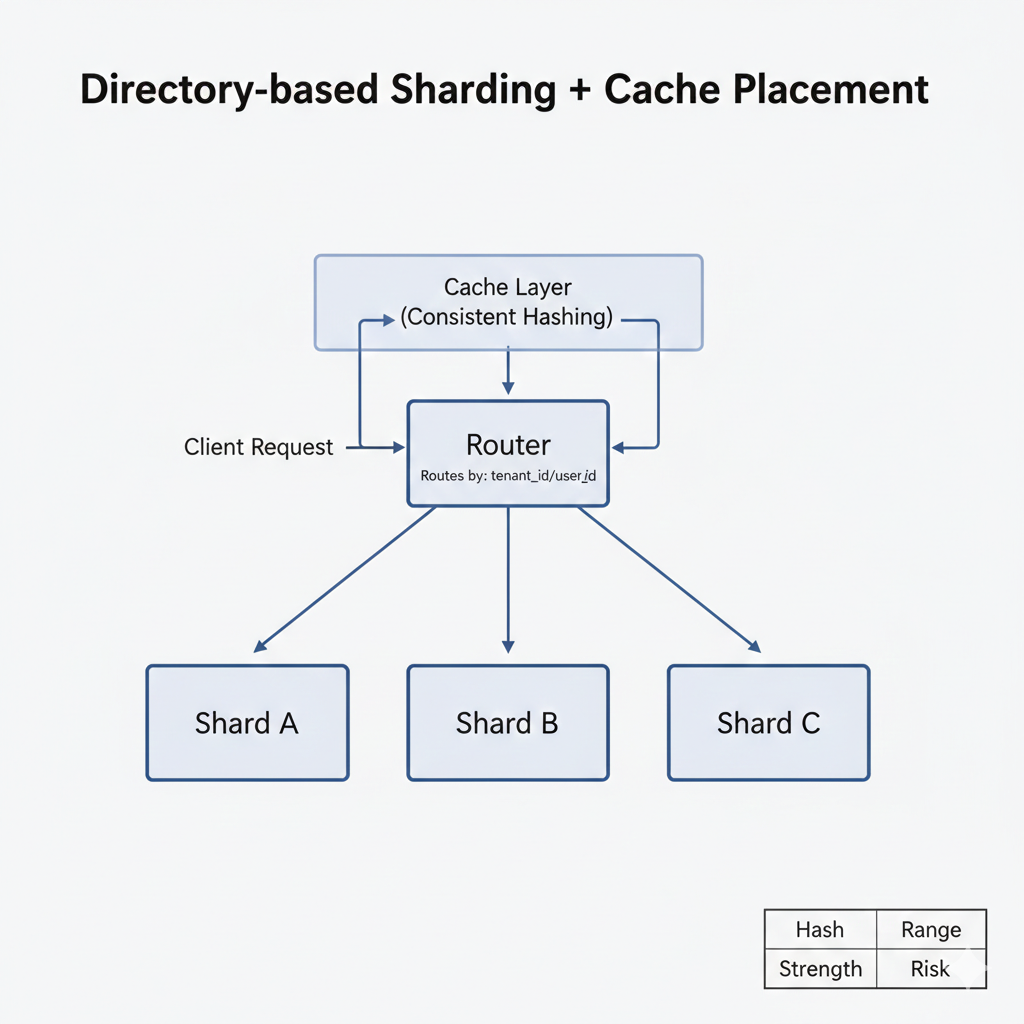
When traffic climbs and p95 latency starts creeping past your SLOs, the mistake is “pause the world and migrate.” The better move is sharding online so the app stays live while you spread load.
Start by choosing a shard key that actually distributes work. In most SaaS products, that is tenant_id or user_id because it’s high-cardinality and maps cleanly to how data is accessed. Then route everything through a centralized routing service so you can move logical shards around without chasing shard logic across your codebase.
This is directory-based sharding: flexible, but only if the router is resilient (replicated, cached, and not a single point of failure).
If your workload needs strict transactions, pick databases that support ACID guarantees and be intentional about cross-shard coordination. Cross-shard transactions are where teams get hurt, so keep them rare, and design around them early.
A simple way to think about sharding strategies:
| Strategy | Strength | Risk |
| Hash | Even load distribution | Cross-shard queries hurt |
| Range | Efficient range queries | Cross-shard queries hurt |
What keeps this stable in production is monitoring and gradual movement:
- Track QPS, p95 latency, storage growth, and cache hit rate per shard.
- Use caching to offload hot reads with sensible TTLs, and monitor hit rate per shard so you spot skew.
- Rebalance gradually. Reallocate hash slots or adjust ranges in small steps to limit cache churn.
- When one tenant gets hot, isolate them to a dedicated shard instead of letting them poison everyone else.
- Keep cache and shard rebalancing online, using directory routing so traffic shifts without downtime.
If you want a second set of eyes, AppMakers USA can help you plan safe cutovers and rebalancing rules before sharding becomes a high-risk emergency.
Scale Performance Without Scaling Waste
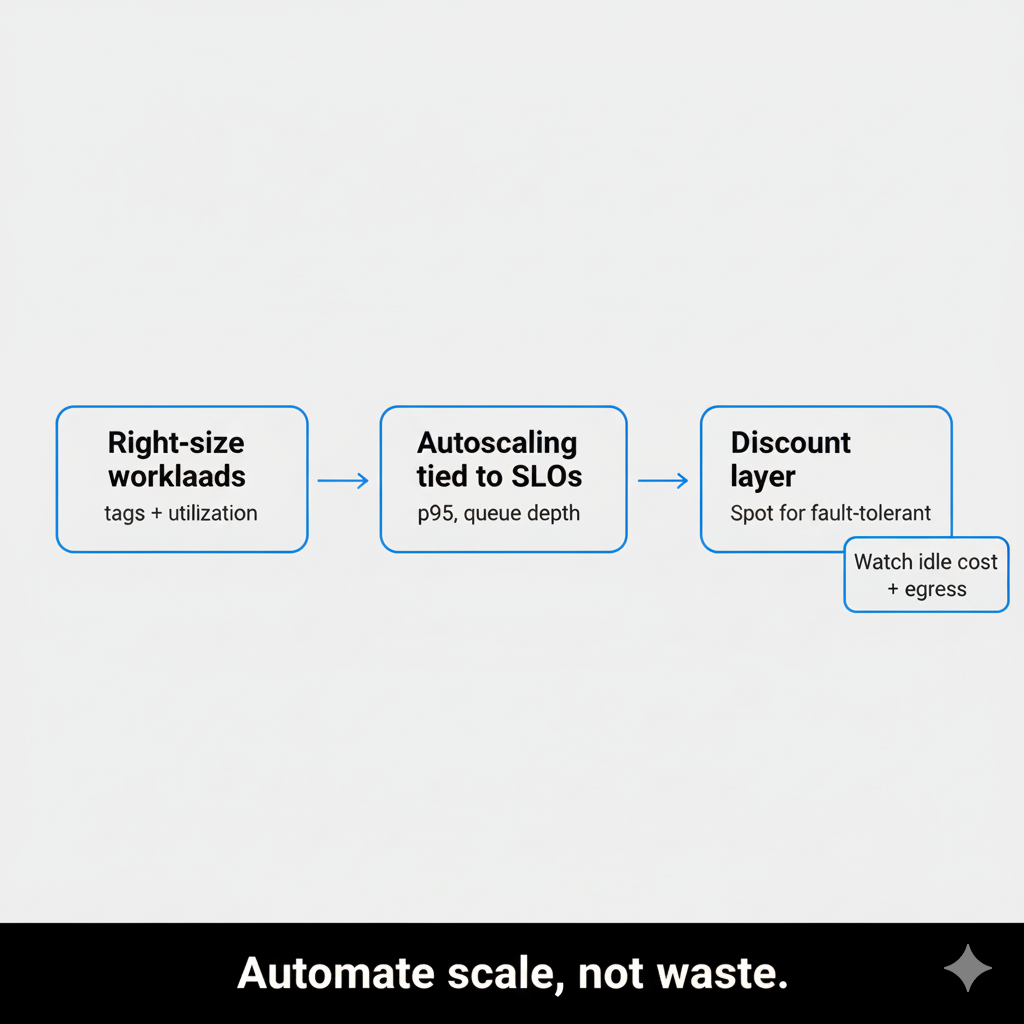
Once your app tier and data layer can scale, your next bottleneck is usually the bill. The trap is scaling “successfully” while quietly scaling waste.
A good rule: right-size first, then autoscale. Otherwise you just automate overprovisioning. IDC estimates 20–30% of cloud spend is wasted, and Datadog’s 2024 report found 83% of container costs tied to idle resources.
The practical approach that keeps you fast and not broke are these:
1) Right-size by workload class, not gut feel
Different workloads need different headroom. Separate them so you stop treating everything like a mission-critical API.
| Workload | What you optimize for | Typical scaling signal |
| Web/API | p95 latency and error rate | RPS per instance, CPU as a secondary |
| Workers/queues | throughput, backlog time | queue depth, job age |
| Analytics/batch | cost efficiency | schedule windows, completion time |
| Dev/test | lowest cost | schedule windows, completion time |
Pull 2–4 weeks of representative traffic, then tune requests and limits so you hit target utilization without violating SLOs. Tag resources by owner, service, and environment so cost has accountability, not mystery.
This is also where AppMakers USA usually gets pulled in: not to “reduce cloud costs” in theory, but to align app architecture, scaling policies, and release cadence so performance stays stable as the product ships faster.
2) Make autoscaling follow SLOs, not vanity metrics
Start simple, then get smarter:
- Use target tracking for steady services. AWS’s own example targets 50% average CPU as a baseline.
- For bursty traffic, use step scaling or scale on signals that correlate to user pain: queue depth, p95 latency, request rate per target.
- Scale down aggressively, but with guardrails (cooldowns, minimums, and error-budget awareness) so you do not thrash.
3) Use discounts where the workload can tolerate it
Spot Instances can be up to a 90% discount versus On-Demand, but only if you design for interruptions. Use them for stateless tiers, workers, and batch jobs, not fragile singletons.
4) Do not ignore hidden costs
Data egress and chatty service-to-service calls can quietly dominate spend at scale. Track cost per service, and watch cross-AZ and cross-region patterns as closely as CPU.
The 3-5 Year Infrastructure Roadmap That Prevents Panic
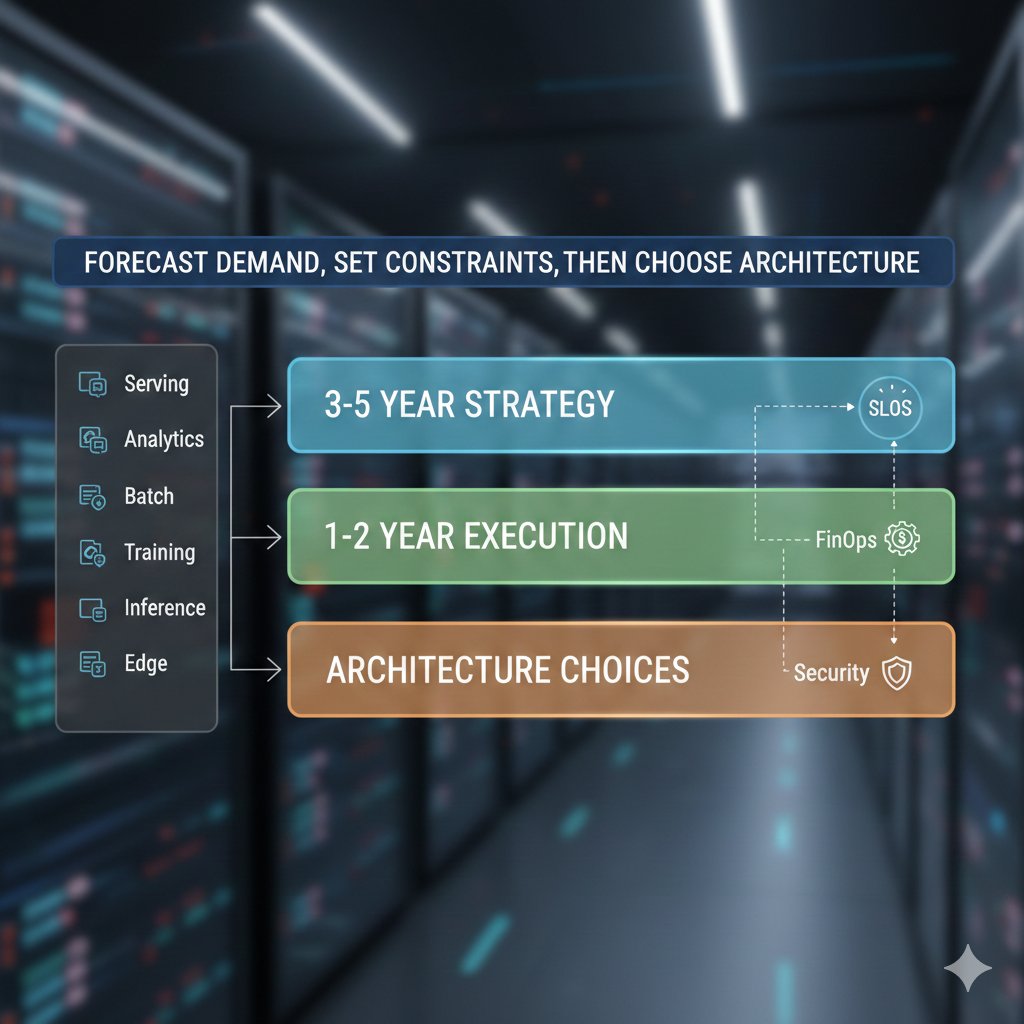
Cost controls keep you efficient today. A roadmap is what keeps you from re-architecting in a panic every time the product adds a new growth lever.
Start with the reality that infrastructure is downstream of business goals. If revenue targets and product bets are changing, your capacity plan has to translate that into compute, storage, network, and yes, GPU capacity, especially once you add AI features that swing workloads from quiet to spiky.
Build the roadmap backward from demand
Back-calculate yearly targets from your forecasts, then split them by workload so you are not mixing apples and oranges:
- Serving and APIs
- Analytics and reporting
- Batch jobs
- Model training
- Real-time inference
- Edge or regional workloads
This is also where AppMakers USA helps teams the most. We take the product roadmap and turn it into an infrastructure plan that is measurable, budgetable, and not dependent on heroics.
Lock the constraints before you pick architecture
Set SLOs and non-negotiables up front:
- Latency and uptime targets
- Data residency requirements
- Retention and backup policies
- Regional coverage and failover expectations
Then choose regions and deployment patterns that actually meet those constraints. Otherwise you are just moving diagrams around.
Layer it so stakeholders can follow it
Keep one roadmap, but make it readable at different zoom levels:
- Strategic (3-5 years): the big themes and capability milestones
- Tactical (1-2 years): what you are building next and why
- Architecture choices: cloud, platform, GPU tiers, and the tradeoffs
Treat security, compliance, FinOps, observability, enablement, and change management as first-class tracks, not footnotes. Each track should have KPIs so progress is provable, not vibes. Ensure the roadmap is communicated with clear visual representation so stakeholders stay aligned as priorities evolve.
Plan GPUs like a portfolio, not a single purchase
Most teams need a mix:
- On-demand burst for unpredictable spikes
- Committed inference capacity for steady workloads
- Dedicated training capacity when training is a real requirement
Put guardrails in place early like batching, quantization, clear governance, and cost visibility. Just as music platforms architect their stacks to reliably deliver high-fidelity audio at scale, your GPU roadmap should anticipate peak demand patterns and quality-of-service expectations from day one.